Placing Orders
You may submit orders using the order form on the Trade tab.
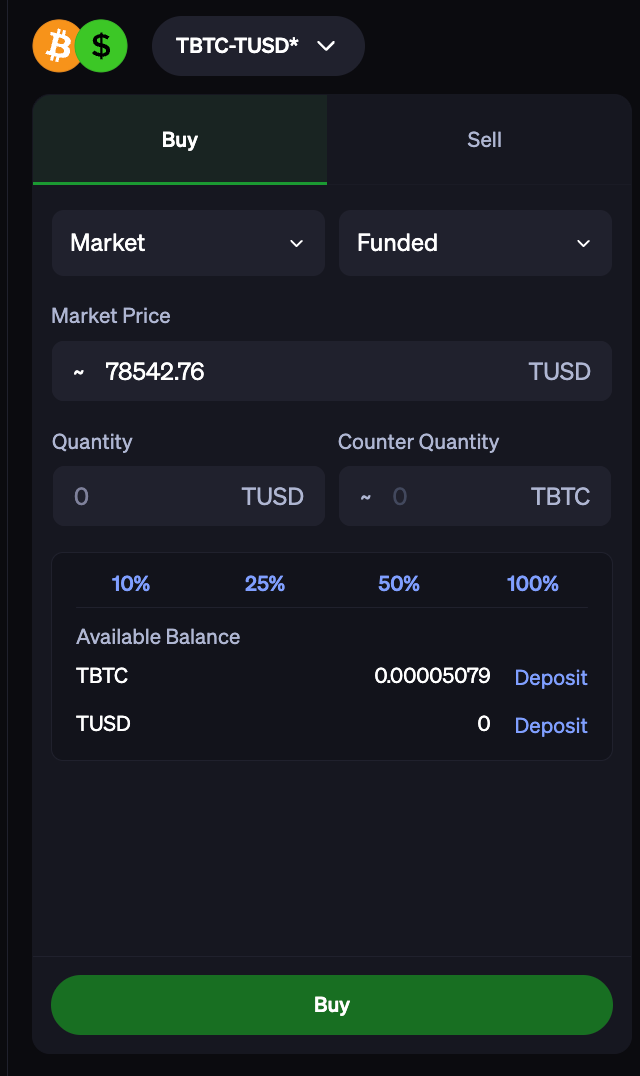
The basic features available for Trade include:
Order: Buy | Sell
Trade Pair: BTC-USD | ETH-USD and many more
Execution Strategy: Market | Limit | TWAP | Steady Pace
Amount: USD or Crypto base units, depending on above selections
Account: Funded | Margin
Eligibility/access to “Margin” is subject to approval. Reach out to your BitGo point of contact for more information.
More on Execution Strategy
Choose from multiple order types designed to align with your trading strategy, urgency and market conditions.
Market order: executes immediately at the best price available
Limit order: executes at or better than the specified limit price during the defined time in force configuration
Time weighted average price: a schedule-based execution strategy that divides a large order into smaller, evenly sized trades executed over a defined time period, passively following the schedule while adapting to market conditions to ensure full completion
Steady pace: executes by taking liquidity based on specified clip size and interval. Minimizes market impact, tracking market average
Stop Order Type: automatically executes a trade when the market hits a trigger price you set
Trade in Your Preferred Unit: ability to place orders either in the asset or its dollar value (e.g., buy 1 BTC directly or specify $60,000 USD worth of BTC)
Fill or Kill: orders can either fill completely at a quoted price or are cancelled entirely, eliminating partial fills.
The minimum order size is $6 USD*. There are currently no limits on number of orders or volume.
* select trade pairs, subject to change
Roles Able to Place Orders
Users who are designated as Spenders and Traders within their enterprise can execute trades within the Go Account
Note: spenders will be able trade and withdraw assets while Traders will only be able to initiate trades but not withdraw assets
There may also be view-only users, Viewers and Auditors, that can see activity but cannot trade
Order History
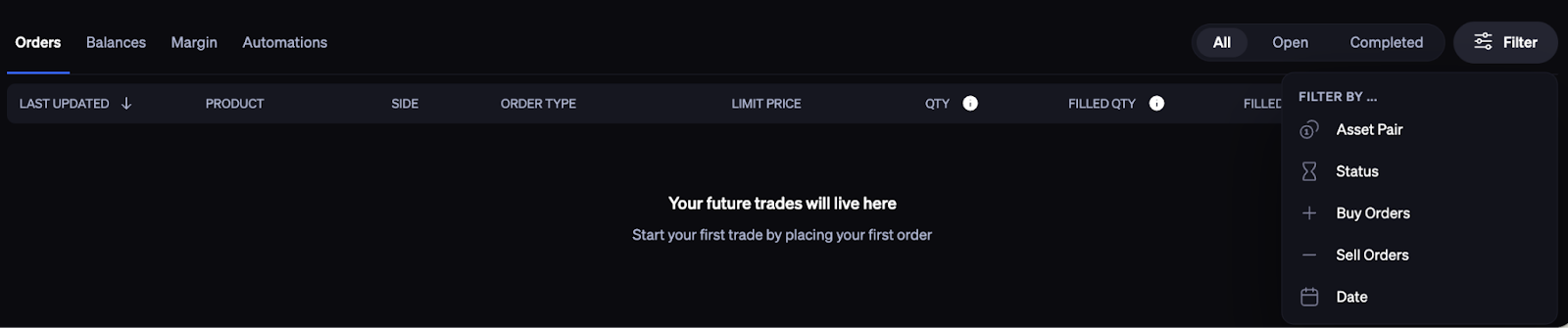
All recent and past orders will show up in the Orders section on the bottom dashboard. Clicking on a given trade will pull up the full details of that trade. You can also Filter by asset pair, status, buy orders, sell orders, and date.
Was this article helpful?
That’s Great!
Thank you for your feedback
Sorry! We couldn't be helpful
Thank you for your feedback
Feedback sent
We appreciate your effort and will try to fix the article